


Wander Weather
4.367.00 Reviews
App Specs
- Version
- 1.1.5
- Updated On
- License
- Free
- Downloads
- 1,000,000+
- Developer
- Leapora Tech
- Categories
- Weather
- Platform
- Android
Screenshots
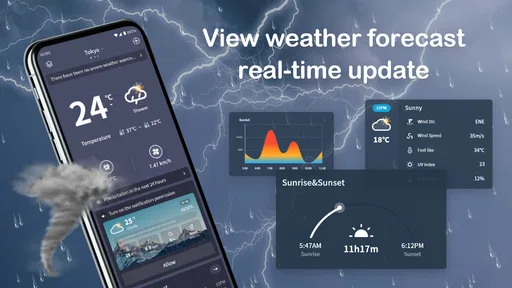
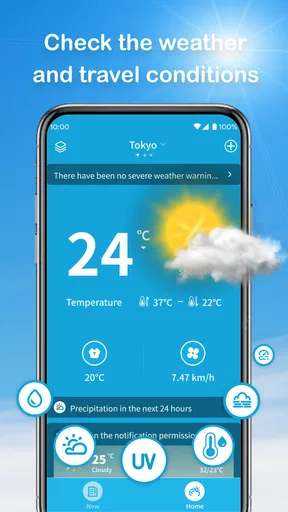
 Analysis by AppCompare
When I decide whether a weather app belongs on my phone, I start with a practical question: will it help me make a better choice about the day ahead, or is it just another screen to check? Wander Weather is aimed at the first kind of decision, especially when the day involves a destination, a journey, or plans that may need to change with the sky. I find that travel-first focus useful, though it is not automatically a reason for everyone to switch from a familiar forecast app.
For an ordinary workday, a quick local forecast may be all I need. For a weekend away, I want to think across several days and decide what to pack, when to head outdoors, and what to do if rain interrupts the plan. That difference is the key to judging this app: it makes most sense when weather is part of planning a trip, rather than a small detail to check at the door.
Start with the kind of forecast you actually need
Before choosing a weather app, I would ask how far ahead I usually plan and whether I need to compare conditions across a trip. If I only want a quick glance at the weather where I am, a standard local forecast may be simpler. If I am choosing between outdoor plans on different days or preparing for a destination I have not reached yet, a travel-oriented view can make the information easier to use.
That distinction also helps set expectations. A forecast is a planning aid, not a guarantee that a particular outing will go ahead exactly as imagined. I would use the outlook to make a sensible first plan, then check it again closer to departure, especially before committing to weather-sensitive activities. The useful question is not only “Will it rain?” but “How much should I let this forecast shape my choices today?”
Where a travel-first view earns its place
The strongest reason to consider Wander Weather is that it connects weather checking with trip planning. Rather than treating a destination forecast as an isolated glance, the app’s travel planner is described as showing conditions across the days of a journey and offering activity suggestions based on the forecast. That framing can save a little mental juggling: I can think about the trip as a sequence of days, not just one destination and one general prediction.
A practical way I would use that is to sketch a flexible itinerary before leaving. I might keep an outdoor activity on the clearer-looking day and leave a more sheltered option available for a less promising one. The value is not that an app can decide what I will enjoy; it is that a forecast tied to the trip can make it easier to notice where a backup plan belongs.
It may also suit someone who is still deciding what to pack. A multi-day outlook can prompt a more considered choice between light layers, a rain jacket, or footwear for changing conditions. I would avoid treating a distant forecast as a packing checklist, but it can help identify what is worth keeping accessible rather than buried in a bag.
Worth Reading Before You Choose

Flipboard Shows What News Apps Must Do Beyond the Feed

Switching to Android Auto Means Rethinking Your Driving Routine

Google Calendar Makes a Crowded Week Easier to Manage

Ludo King Makes the Most of the Minutes Between Plans

Baby Panda World Brings Quick Play to Modern Phones, but Its Game Library Feels Busy

ESPN’s Live Game View Makes Following Close Games Easier
How it compares with familiar weather apps
Most general-purpose weather apps are built around checking the conditions in a current or saved location. That works well for routines: deciding whether to walk, commute, or bring an umbrella. Wander Weather’s appeal is more specific. Its trip-planning approach gives the forecast a reason to be viewed in relation to travel dates and possible activities, which is a different emphasis from simply opening an app to see today’s temperature.
I would not assume that travel focus makes it the best choice for every weather question. Someone who wants a particular specialist view, a highly detailed local weather workflow, or a familiar set of tools may prefer the app they already use. The sensible comparison is to try the same real decision in both: check a planned destination and see which layout helps you understand the coming days with less effort. A clean presentation matters only if it helps you act.
Small habits that make the planner more useful
For a trip with several stops, I would think through the itinerary in manageable chunks instead of expecting one forecast view to settle every detail. Check the destination days that affect your main plans, note which activities can move, and leave room to revisit the forecast as the journey approaches. This turns the app into part of a planning routine rather than a one-time prediction that you forget to verify.
I would also separate decisions by how costly they are to change. Choosing a museum as a rainy-day alternative is easy to revise; arranging a long outdoor excursion may take more commitment. Use the forecast to decide which plans need a backup, but keep the backup realistic and convenient. That is a useful trade-off with any weather tool: the more confidently a screen presents a forecast, the easier it is to mistake a prediction for certainty.
Notifications can help when I am busy, but I would be selective about relying on them. The original appeal is that updates and alerts reduce the need to repeatedly open the app. In practice, I would treat an alert as a prompt to reassess a plan, not as a command to cancel it. For an activity with safety implications, checking current conditions and relevant local guidance is a better habit than depending on a general travel forecast alone.
Making the choice for your next trip
I’d use this section to weigh the practical choice behind a travel-focused forecast: whether organizing weather around a destination and itinerary would simplify your planning, or whether your usual local forecast already does the job. For a useful first test, pick one upcoming trip and decide in advance what information would genuinely change your plans; that makes it easier to judge the app on its real value rather than on a quick first impression.
What to expect from the everyday experience
Ever tried to plan a trip and the weather just doesn’t want to play nice? Well, let me introduce you to Wander Weather, your new travel buddy that promises to keep you prepared for whatever Mother Nature has in store. I recently downloaded it, and let me tell you, it’s like having a personal meteorologist in your pocket.
So, when you first open Wander Weather, you’re greeted with a sleek and minimalistic design. No unnecessary clutter, just the essentials. It’s intuitive enough that you don’t need a degree in meteorology to navigate through it. The app offers a fresh approach, focusing on the user experience. I was immediately drawn to its simplicity, which makes it super easy to find the information you need without any hassle.
Features That Stand Out
Now, onto the good stuff—what makes this app tick? First off, it’s not just about checking if you need an umbrella tomorrow. It’s designed for wanderers, hence the name. You can select your travel destination and get a detailed forecast for your trip dates. It’s like having a crystal ball that tells you if your beach day will be sunny or if you’re going to need to pack a raincoat.
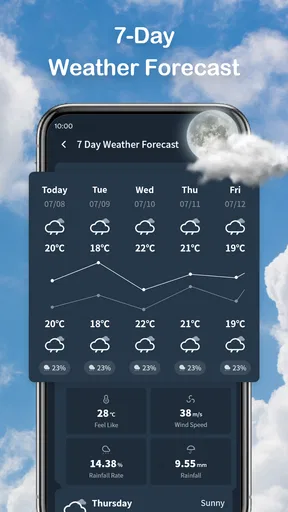
The app provides hourly and 7-day forecasts, which are surprisingly accurate. I tested it out by comparing it with other weather apps and it didn’t disappoint. The forecasts are color-coded, making it super easy to glance at the screen and know what’s up.
Planning Your Adventures
One of the coolest features has to be the travel planner. You input your trip details, and the app shows you the weather for each day of your journey. It even suggests activities based on the forecast. Planning a hike? Wander Weather will let you know if the trails will be clear or if you should opt for a museum day instead. This is a game-changer for spontaneous travelers who love to keep their options open.
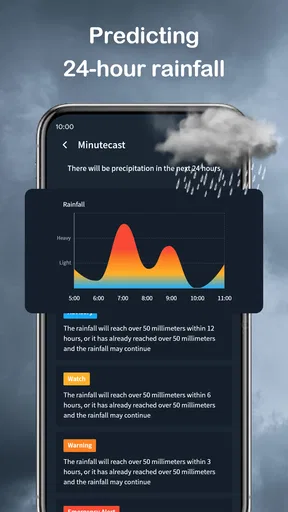
And let’s talk about the notifications. Not all of us have the time to check the weather every hour. The app sends you timely updates and alerts, so you’re always in the know. It’s like having a friend who keeps an eye on the sky for you.
Who should keep looking, and what switching involves
For a realistic example, imagine leaving home for a weekend away with one outdoor plan and one indoor alternative. I would use the trip view to decide what to prioritize, check the hourly forecast before setting out, and keep the backup easy to reach if conditions look less suitable. That is a more useful workflow than checking the weather once while packing and assuming it will stay unchanged.
The app may be a good fit for people who travel often, plan flexible weekends, or like seeing a forecast in the context of a whole itinerary. It is less compelling if all you need is a quick local reading, or if you prefer a weather service built around specialist detail rather than travel planning. In those cases, keeping your usual app may be the lower-friction choice.
Switching does not have to mean deleting another weather app. I would first try Wander Weather on one upcoming trip and compare how naturally its destination and date-based approach fits the way I plan. If I still need a separate app for my daily routine, there is no need to force a replacement. The useful test is whether it makes trip decisions easier enough to earn a place alongside the tool I already trust.
Wander Weather is a free weather app from Leapora Tech, rated for Everyone and currently at version 1.1.3. It has a 4.5 average from 853 ratings and more than 500K installs. It was released on November 4, 2025, and runs on Android 6.0 or later. Those details make it easy to understand who can try it, but the deciding factor for me is still whether its travel planner suits the trips I actually take.
What the forecast can—and cannot—decide
A common question is whether a trip planner can tell me exactly what to do each day. I would use its activity suggestions as ideas, not as a substitute for local knowledge or my own priorities. A forecast can help me spot a promising window or think of an indoor alternative, but it cannot know whether a particular trail suits my group or whether a venue fits the day.
Another practical question is whether the app replaces checking the weather at home. Its hourly and seven-day views may cover many everyday checks, but its clearest reason to stand out is organizing forecasts around travel. If I mostly want a habitual glance at my local conditions, my current weather app could remain more convenient. I would choose based on the task, not on the assumption that one app must do everything.
There is also a trade-off in keeping alerts enabled: they can reduce repeated checking, but too many interruptions can become noise. I would keep notifications useful by paying attention to the updates that could change an outing, then make the final call with the latest conditions in mind. This is especially important when plans depend on weather-sensitive routes or outdoor exposure.
What’s the Verdict?
So, after spending some time with Wander Weather, would I recommend it? Absolutely. It’s a must-have for anyone who loves to travel and wants to be prepared for all kinds of weather. The interface is clean, the information is reliable, and the added features make it a standout choice among weather apps.
Sure, there are other weather apps out there, but this one feels like it was made with travelers in mind. Whether you’re a globetrotter or just planning a weekend getaway, Wander Weather ensures you won’t be caught off guard by unexpected weather changes. It’s like having a trusty sidekick that helps you make the most of your adventures.
So next time you’re planning a trip, give Wander Weather a whirl. It might just become your new favorite travel companion. Happy wandering!
Pros
- Accurate weather forecasts with live updates.
- User-friendly interface with intuitive navigation.
- Customizable alerts for severe weather conditions.
- Beautiful design with stunning weather animations.
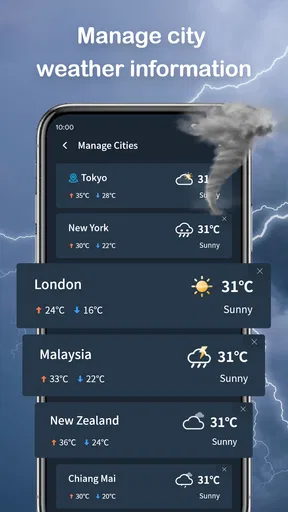
- Supports multiple locations for easy tracking.
Cons
- Occasional delays in weather alert notifications.
- Some features require premium subscription.
- Limited widget customization options.
- App can be resource-intensive on older devices.
- Ads can be intrusive in the free version.
FAQs for Wander Weather
What features does Wander Weather offer that make it stand out from other weather apps?
Wander Weather provides hyper-local weather forecasts, real-time alerts, and an intuitive interface that adapts to your location. It also includes unique features like personalized weather insights and travel-based weather tips, making it ideal for frequent travelers who need accurate weather information on the go.
Is Wander Weather available for both Android and iOS devices?
Yes, Wander Weather is available for both Android and iOS platforms. Users can download it from the Google Play Store or the Apple App Store. The app is designed to provide a seamless experience across different devices, ensuring that you have access to the latest weather updates anytime, anywhere.
Does Wander Weather require a subscription or is it free to use?
Wander Weather is available as a free download, offering essential features without any cost. However, there is a premium version available that unlocks advanced features such as ad-free usage, premium weather radar, and extended forecast options, providing an enhanced user experience for those who need more detailed information.
How accurate are the weather forecasts provided by Wander Weather?
Wander Weather uses advanced meteorological data and predictive analytics to deliver highly accurate weather forecasts. The app sources information from multiple reliable weather stations and incorporates AI technology to provide precise and timely updates, ensuring users are well-prepared for any weather conditions.
Can I customize notifications in Wander Weather to suit my needs?
Absolutely, Wander Weather allows users to customize notifications based on personal preferences. You can set alerts for specific weather conditions like rain, snow, or severe weather warnings. This feature ensures you only receive relevant notifications, helping you stay informed without unnecessary distractions.


